
Import Products into Manufacturing Schedule
Quickly turn your inventory products into manufacturing schedules in Planufac.
If you have products set up with a Bill of Materials (BOM), you can select multiple items directly from the Inventory List and send them straight to the schedule creation form.
This feature saves time when you need to plan production for several BOM-based products at once — ideal for batch manufacturing, fulfilling multiple orders, or preparing production runs.
Step-by-Step Guide
-
Go to the Inventory List Navigate to: Inventory → List
(Direct link: https://my.planufac.com/inventory/list)
- Select the Products
- Use the checkboxes to multi-select the products you want to manufacture.
- Only products that have a BOM defined will be eligible for schedule creation (non-BOM products will be ignored or show a warning if selected).
- Choose the Action
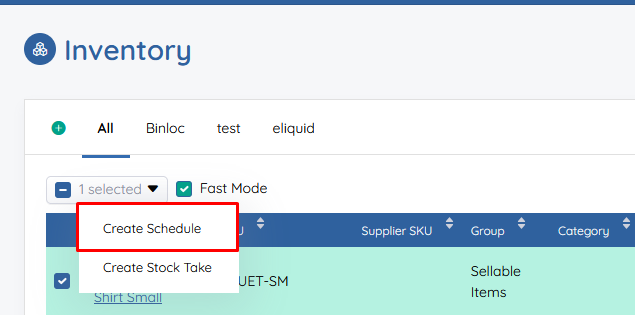
- With your products selected, look for the bulk actions dropdown menu (usually at the top of the list, near the search/filter bar).
- Select Create Schedule from the dropdown.
-
- Review & Create the Schedule
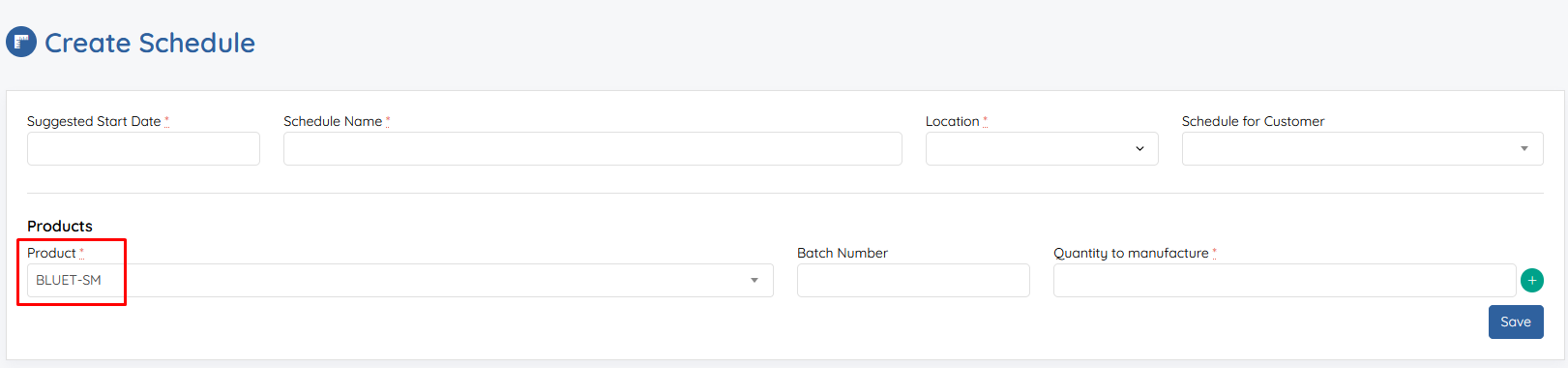
- You will be redirected to the Manufacturing Schedule Creation page: https://my.planufac.com/schedules/create
- The selected products (with their BOMs) will be pre-populated into the form.
- Adjust quantities, dates, priorities, resources, notes, or any other schedule details as needed.
-
Click Create (or Save) to generate the new manufacturing schedule(s).
Key Benefits
- Speed: No need to manually add each product one-by-one to a new schedule.
- Accuracy: BOM components, routings, and quantities are pulled automatically.
- Batch Efficiency: Perfect for planning weekly/monthly runs or responding to grouped customer orders.
- Error Reduction: Minimises manual data entry mistakes.
Tips & Best Practices
- Ensure products have a complete BOM set up beforehand (including components, quantities, and optional routing/steps).
- Use filters/search in the Inventory List to quickly find the right products (e.g., by category, status, or low stock).
- After creating the schedule, check the Schedules dashboard to confirm everything looks correct and assign it to production teams if required.
Troubleshooting
- "Create Schedule" option missing? Make sure at least one selected product has a valid BOM.
- No products pre-filled after redirect? Double-check your selections — only BOM-enabled products are transferred.
- Need to schedule only specific quantities? You can edit quantities directly on the create form after import.
If you run into any issues or want to schedule multiple different quantities/variations, feel free to reach out to Planufac support.
Last Updated: January 19, 2026