
KYC Check Alert
KYC means Know Your Customer. It’s a quick way to make sure we properly check customers who spend a lot.
Step 1: Set the flag on contacts
- Open any contact in the editor.
- Find the new dropdown KYC Completed?
- Set it to No for customers who still need checking.
- Change it to Yes once you’ve done the KYC.
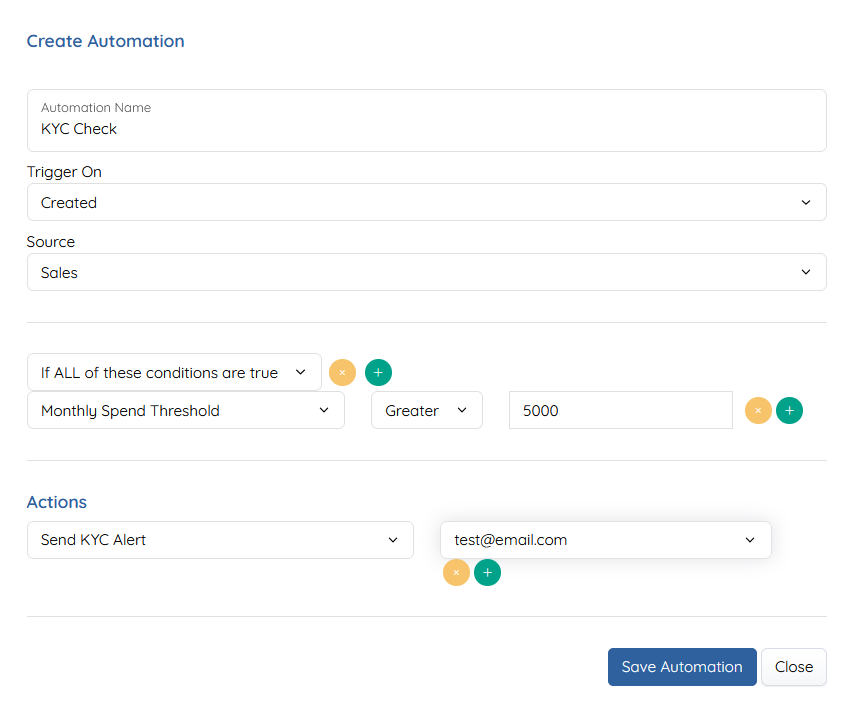
Step 2: Set up the automation
Go to: https://my.planufac.com/automation/list
Click + and copy this setup:
- Automation Name: KYC Check
- Trigger On: Created
- Source: Sales
Conditions (If ALL of these are true):
- Monthly Spend Threshold → Greater → 5000
Actions:
- Send KYC Alert → to your email (e.g. test@email.com)
Save it.
How it works
- Every time a new sale is created...
- If the customer’s KYC Completed? is No...
- And they have spent more than £5000 this month... → You get an email alert.
What to do
- Do the KYC check when you get the email.
- Go back to the contact and change KYC Completed? to Yes.
- This stops the alerts for that customer.
Tip: If you forget to set it to Yes, you will keep getting emails on every new order once they pass the £5000 mark.