
Duty Warehouse Number on contacts
Overview
Contacts in Planufac now include a Duty Warehouse Number field.
Use this to store a contact’s duty warehouse reference alongside other trade and compliance details (for example UKIMS Number and EORI Number).
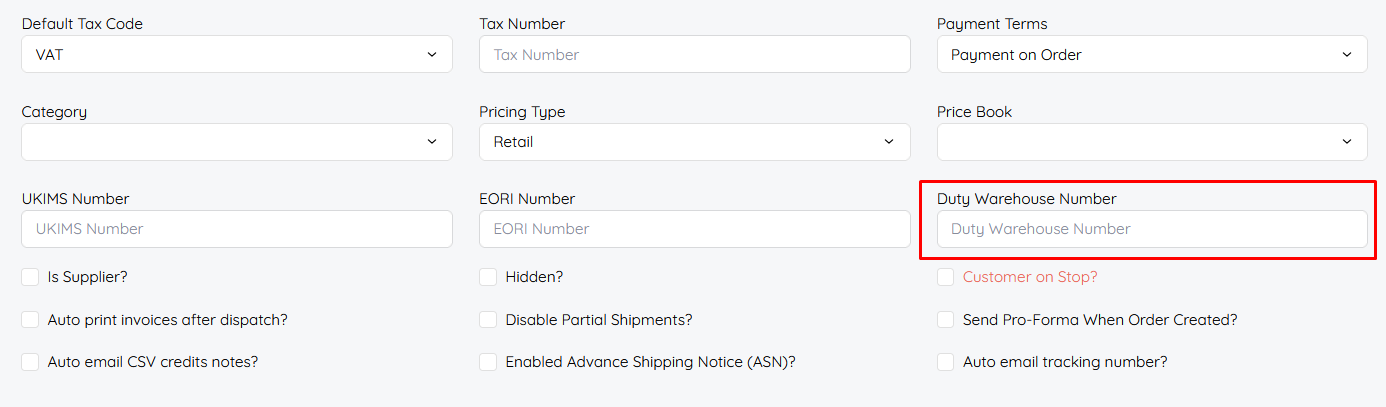
Where to find it
- Go to Contacts
- Open an existing contact or create a new one
- Find Duty Warehouse Number on the contact form
It appears with related fields such as:
- UKIMS Number
- EORI Number
- Tax Number / Default Tax Code
- Payment Terms, Category, Pricing Type, and other contact options
How to use it
- Open the contact editor.
- Enter the duty warehouse number in Duty Warehouse Number.
- Save the contact.
Leave the field blank if the contact does not need a duty warehouse number.
Importing and updating contacts
Duty Warehouse Number is supported on contact imports:
| Import type | Supported |
|---|---|
| Import Data (contacts) | Yes |
| Update Data (contacts) | Yes |
For update data use template, you can get the ID from Imports/Exports under contacts exports.

Import tips
- Include a Duty Warehouse Number column when you want to set or change the value in bulk.
- Blank / null values are allowed — empty cells will not force a value.
- If the column name is not in the file, the import still runs; other columns are processed as usual.
This follows the same contact import behaviour as other optional contact fields: missing columns should not stop the import.
When you might use it
- Storing a customer or supplier duty warehouse reference for customs / bonded warehouse workflows
- Keeping compliance references on the contact record in one place with UKIMS and EORI
- Bulk-loading or refreshing the value via contact import templates