
Set bin locations on size variants
You can now manage Bin Locations on size variant products the same way you do on the parent product.
Previously, multi-location bin fields were only available on the main product. Size variants already had their own SKUs, but you could not maintain the full bin location layout per size. That is now available on the size variant product editor.
This helps warehouse and picking accuracy when different sizes of the same product are stored in different bins.
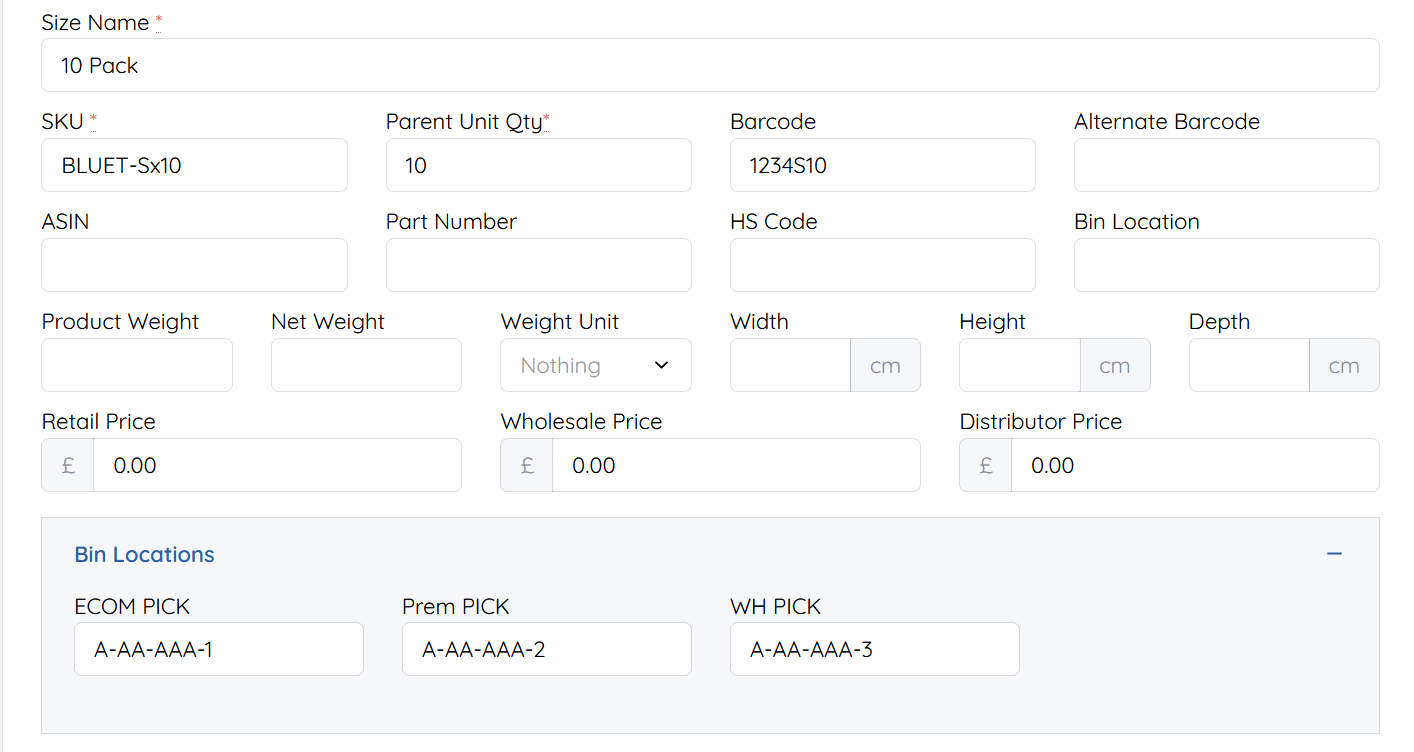
Where to find it
| Step | Location |
|---|---|
| Open a product | Products → open the parent product |
| Open sizes | Product editor → Sizes |
| Open a size variant | Select / edit the size you want |
| Bin locations | Bin Locations section (same style as the parent product) |
Typical path:
Products → Edit product → Sizes → open size variant → Bin Locations
How to use it
- Go to Products and open the parent product that has size variants.
- Open the Sizes tab (or sizes area) for that product.
- Open the size variant you want to update (for example a specific size/pack size with its own SKU).
- Expand or open Bin Locations.
- Enter the bin value for each warehouse / location field shown (same fields you already use on the parent product).
- Save the size variant.
Each size variant keeps its own bin values because each size has its own SKU. Updating one size does not overwrite bins on the parent or on other sizes.
(Optional: insert screenshot of Sizes → size variant → Bin Locations here.)
When to use it
| Situation | What to do |
|---|---|
| Sizes live in different warehouse bins | Set bin locations on each size variant, not only the parent |
| You already use Bin Locations on parent products | Use the same fields on the size variant editor |
| One SKU per size for picking | Maintain bins per size so pickers see the correct location |
Notes
- Size variants use their own SKUs. Bin locations saved on a size apply to that size’s SKU.
- The Bin Locations fields on size variants match the parent product layout for your locations setup.
- If you only stock the parent SKU and do not pick by size SKU, you may still only need bins on the parent product.
- Permissions: you need access to edit products / size variants to change these fields.